Time tracking is a common need in many companies, but it is not always well resolved. There are still businesses that manage clock-ins with paper sheets, Excel files, messages, old time clocks or impractical systems that end up generating errors, doubts and administrative work.
With a digital time‑tracking tool, the company can manage clock-ins, breaks, incidents, schedules and reports in a much more organized way.
At R-Systems Girona, through RClock, we offer a time‑tracking solution designed for companies that want to simplify the management of working hours and keep information more controlled.
Why is it important to digitalize time tracking?
Time registration should not be a burden for the company or for employees. When managed manually, errors easily appear: incorrectly recorded hours, lost sheets, unregistered breaks, unclear incidents or reports that are difficult to prepare.
Digitalizing this process helps provide a clearer view of day‑to‑day activity and simplifies administrative management.
Common problems with manual time tracking
- Incomplete clock-ins or entries recorded at the wrong time.
- Time sheets that are difficult to review.
- Errors in hour calculations.
- Doubts about breaks, absences or incidents.
- Lack of clear reports by company, employee or period.
- Time wasted manually reviewing data.
What is RClock?
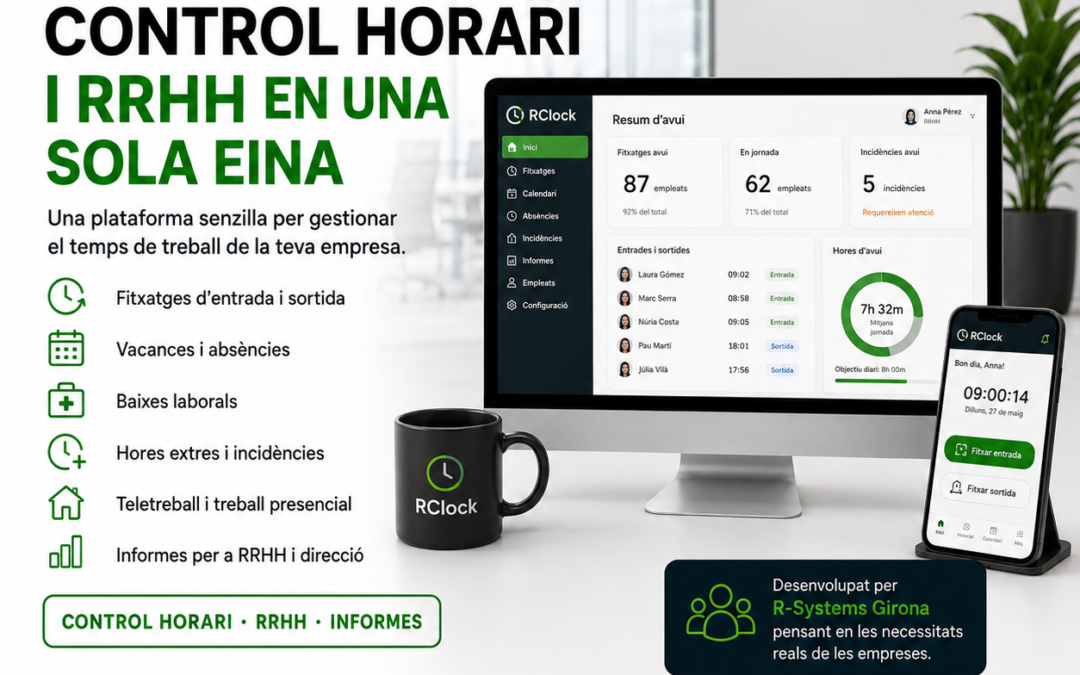
RClock is a time‑tracking solution developed by R-Systems to help companies manage the working‑day registration of their employees digitally.
It allows centralizing clock-ins, consulting time information, reviewing incidents and having clearer reports for internal company monitoring.
The goal is for time tracking to be a useful tool, not an added complication.
Simpler and more controlled digital clock-ins
One of the main points of a time‑tracking system is to make clock‑ins easier. The company needs to know when the working day starts and ends, but must also ensure the process is simple for users.
With RClock, time registration can be managed digitally, reducing dependence on manual documents and improving information control.
What can a company control?
- Clock-ins and clock-outs: registration of the start and end of the working day.
- Breaks: control of rest periods or interruptions during the day.
- Incidents: recording and reviewing special situations.
- Schedules: monitoring working days and time worked.
- Reports: data available by employee, period or company.
Less administrative work
A good time‑tracking software should help the company reduce administrative work. When data is digitalized and centralized, it is easier to review, export or consult whenever needed.
This is especially useful for companies with several employees, different shifts, mobile teams or people working in different locations.
Instead of manually reviewing sheets, the company can work with more organized and accessible information.
Time tracking for different types of companies
Each company organizes its teams differently. Some work with fixed schedules, others with shifts, others with mobile staff or teams that are not always physically in the same office.
That is why a time‑tracking tool must be flexible enough to adapt to different environments.
RClock can fit companies such as:
- Offices and professional firms.
- Service companies.
- Retail businesses with on‑site staff.
- Industries and companies with shifts.
- Teams with employees in different locations.
- Companies that want to move away from manual time tracking.
Reports and traceability
Having data is important, but being able to consult it clearly is even more important. Time‑tracking reports allow reviewing working days, absences, breaks, incidents and information related to working time.
This traceability helps the company maintain better internal control and reduce doubts in daily management.
It also makes it easier for managers to review information without having to reconstruct data from sheets, emails or scattered notes.
Time tracking and human resources management
Time tracking is part of people management. It not only serves to know how many hours have been worked, but also to improve team organization.
A tool like RClock can help detect recurring incidents, review time patterns, gain more visibility into team performance and simplify administrative work related to time registration.
A proprietary solution by R-Systems
RClock is part of the proprietary solutions developed by R-Systems Software. This allows us to know the tool well, adapt it to real needs and provide close technical support to the companies that use it.
Unlike other generic solutions, technical support and proximity are an important part of the service. We assist with setup, configuration, initial questions and ongoing support.
What should a company review before implementing time tracking?
Before implementing a time‑tracking tool, it is advisable to review how the company currently works and what its needs are.
- How many employees need to clock in.
- Whether there are fixed schedules, shifts or variable working days.
- Whether employees are in a single location or in different places.
- Which incidents need to be recorded.
- Who will review the data and reports.
- Whether an existing manual system needs to be replaced.
RClock within a broader digital strategy
Time tracking can be a first step toward digitalizing other internal processes. When a company starts organizing data and processes, it often identifies other areas that can also improve: incident management, documents, approvals, reports or automations.
For this reason, at R-Systems Girona we can integrate RClock within a broader vision of business software, process automation and IT support.
Do you want to digitalize your company’s time tracking?
If you are still managing clock-ins with paper, Excel or impractical systems, it may be a good time to consider a digital solution.
At R-Systems Girona we can help you implement RClock and adapt time tracking to your company’s needs.
Do you need a clear and easy‑to‑manage time‑tracking tool?
Contact us and we will help you digitalize clock-ins, breaks, incidents and reports with RClock.


